Showing posts with label tech. Show all posts
Showing posts with label tech. Show all posts
Tuesday, June 9, 2015

Thursday, April 16, 2015
Use this easy trick to speed up your android phone
IF your android phones hasn't been so snappy lately, try this easy trick to make your phone feel faster

Normally, the default setting for the window, transition, and animation scale is set at "1.0x". You can change this to "0.5x" or even turn it off to make your phone feel snappier. It cuts/speeds up the animation and transitions that your see, making an illusion that your phone feels faster.
Settings--->developer options--->scroll down to "window animation scale"--->change speed to "0.5x" or "off"--->do same for "transition and animator" option
This also should work for android tablets as well
Hope this helps!
Normally, the default setting for the window, transition, and animation scale is set at "1.0x". You can change this to "0.5x" or even turn it off to make your phone feel snappier. It cuts/speeds up the animation and transitions that your see, making an illusion that your phone feels faster.
Settings--->developer options--->scroll down to "window animation scale"--->change speed to "0.5x" or "off"--->do same for "transition and animator" option
This also should work for android tablets as well
Hope this helps!
Saturday, March 14, 2015
USB-C: "One Size Fits All"
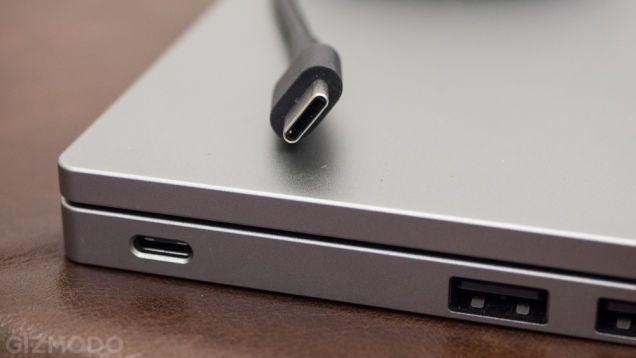
We all have many devices - laptops, phones, tablets, iPods, etc. As a result, we have a lot of different cables for each device, which is really annoying. Worse yet, the different cables end up in a tangle and frustrates the user. To solve this problem, USB Type-C is the new universal cable that will replace much of the standard ports we see today. It is speculated that in the next few years this new port will replace most of the ports in your phones, laptops, tablets of today. This means that you only need one charger to charger all of your devices. No more tangles, no more frustration. Also, USB Type-C is reversible so you won't have to worry about which side the port will fit. In addition, it is tiny, and can do everything what our modern ports can do but with greater power and speed.
Tuesday, February 24, 2015
How to Remotely Access your Computer
Tech: Connected Living
There is a neat program and app called Teamviewer that lets you remotely control your computer with your smartphone. For example, if you need your essay saved on your computer, but you are at school, you can use Teamviewer to navigate your pc and send that file to yourself. Your smartphone screen acts as the mouse, giving you complete control as if you were at home. You can use this feature anywhere as long as you have internet, and your computer is on with the teamviewer program open. It's handy whenever you need it, and it's also free. The program uses a password and pin to identify your computer, so security isn't a problem. It is available for both Mac, iOS and Windows, android. You can download it here.
Monday, February 16, 2015
A thermostat that learns
Nest is a "smart" thermostat that replaces conventional ones. Many conventional thermostats waste a lot of energy, and rack up your energy bill. I can personally save up to $51 a year in my home if I switched to Nest. It's also a lot user friendly. The neat thing about Nest is that it learns how you use it every day so that it will start to automatically follow that pattern. Waking up with the heater already going, and having it automatically shut off when you leave your home can come in handy. Better yet, it does it so efficiently that you won't be wasting energy. You can also control it via smartphone. Although teenagers won't really need this, Nest can be a great present for your parents.
Saturday, January 31, 2015
Future of Virtual Reality
Microsoft Hololens
Microsoft showed off a futuristic concept of virtual reality. It blends real surroundings with digital layovers, as shown in the video. Although it is still in its early stages, I think that it has the potential to be useful in variety of ways. For example, it can change how visitors see a natural history museum. Visitors can each have one of the hololens and have an interactive experience. For example, when you are looking at fossils of a dinosaur, a digital 3D animation of that dinosaur can pop up and give you a loud "roar". Also, as you are walking down the main hall, a 3D pterodactyl will fly right above you and give an immersive feel. I think this tech will be very useful to engineers. Architects can build their design in 3D and get a much better experience than designing with a mouse and keyboard.
Friday, January 30, 2015
Masterpiece Update
As part of my masterpiece, I will be start posting blogs about tech worth noting. They will appear on my regular blog and can also be found under the "Tech" tab.
Subscribe to:
Posts (Atom)